Showing posts sorted by relevance for query 09 rebuild. Sort by date Show all posts

The '09 Rebuild Part B

You know things are bad when your rebuild has so many parts left over that you can build a secondary desktop computer. Well, that's what's happened with this year's rebuild. I've had the motherboard sitting on the dining table for more than a month now, with a spare case (thanks guys!) and other assorted parts stashed upstairs in the computer room. I didn't build the secondary machine right away because I didn't want to format my old harddrives until I was sure I had everything I needed off them. Turns out that was a good move because I hadn't backed up my Firefox favorites. However, that excuse is now stale, so while the Miss is upstairs taking a nap and the husband is engrossed with Call of Duty 4, I'm going to put this baby together in the kitchen. Pictures coming soon.

Happy Easter!

The '09 Rebuild Pt. I

Anyone who has an avid passion or feels a couple steps above a passing interest in something will experience periods where the need to get into that thing will be higher than others. I'm guessing people who like to travel will have periods where they need to get up and go. J has his moments where there's a burst of car activity and lots of action taking place in the garage, and then there's times when there's a lull and his activity is limited to trolling eBay and the forums for parts. I get that way about music, right now I'm on an extended trance kick... but recently I was bitten by the need to rebuild the computer :-)

OK, I'll spill the beans. Although a large part of this is me giving myself a gift for completing my masters and earning honors, a large part is because I saw that The Sims 3 is being released in June. (If you're not sure what The Sims is, it's only one of the best selling PC games in history. Learn about The Sims 3 here.) I played heavily until things with the masters started getting intense, but now that I'm done I can immerse myself again and a new Sims base game, meant it was time to update so that my machine could handle it. So that's the basis for this build.


I'll start out by listing what I had before I started:


  • ASUS A8R-MX/SI 939 ATI Radeon Xpress 200 Micro ATX AMD Motherboard (shown above)
  • AMD Athlon 64 3800+ Venice 2.4GHz Socket 939 89W Single-Core Processor Model ADA3800BPBOX
  • CORSAIR ValueSelect 1GB 184-Pin DDR SDRAM DDR 400 (PC 3200) Desktop Memory Model VS1GB400C3
  • A 7-series NVIDIA GeForce PCI Express video card (I think either 7600 or 7800)
  • Creative Sound Blaster Audigy SE 7.1 Channels PCI Interface Sound Card
  • ASUS 16X DVD±R DVD Burner with 12X DVD-RAM Write and LightScribe Black E-IDE/ATAPI Model DRW-1612BL-BK
  • A 400 watt PSU that also supported SATA connectors
  • Widescreen Hanspree 19" LCD monitor (HDMI capable)
My initial intent was to upgrade the motherboard, CPU and the RAM, but of course, even the best laid plands...

The '09 Rebuild Part B: Finding a Purpose

If some people could find their purpose in life as fast as I found a use for this secondary machine, the world would be a much better place! Originally, I was going to mess around with Linux on the machine and then J said he wanted it to play Richard Burns Rally. Although I don't think he understands my point, I would feel ashamed to let him play RBR on the second-best machine when I put all that money and effort into building a great machine to play The Sims. So RBR goes on this machine right along with The Sims 3 when it comes out in June.

I was fiddling around with a picture frame by the TV earlier, when it struck me: The TV has a gazillion connections at the back... one of which happens to be an RGB connector with another connector for audio. So... why not build the secondary machine as a media center and slap it onto the TV? J's always watching all sorts of car vids on YouTube and other Web sites, as well as... well, other videos, so why not watch them on 37" instead of on the laptop hunched up at the dining table? As I stated my case earlier: No, it's not something I'd wake up and decide to blow money on, but since we have all the parts... why not? He likes car projects. I like computer projects.

So in short, I slapped the machine together this evening, went out to Wal-Mart after dinner and caught a great deal on a wireless Linksys PCI adapter and now I'm getting set to download XP Sp3 when we go to bed. Hopefully, tomorrow I can hook her up to the TV while J's writing his paper for school and we can see how my idea pans out... anyway, here are the pictures:

Photobucket
I swore my old mobo wasn't going to work because it's been on the dining table collecting dust since early last month LOL


Photobucket
Hand-me-down case with some handy cables (thanks guys!)


Photobucket
Case from the back... that plate had to go. J' had to help me get it clipped in properly because I couldn't get the mobo to fit flush up against the sucker. Tore my nail too. Beast.


Photobucket
My old power supply, Nvidia Geforce 7-series card, IDE DVD writer, IDE 60GB Seagate HD and miscellaneous screws and tools. You can see the IDE 80GB Western Digital that's going into my external HD case up on the counter to the right. I'll use that to transfer stuff from upstairs to downstairs.

Yes, I could setup a network. No, I don't have the patience to figure that out right now :-)


Photobucket
Power supply in. I'd never had to take the top of a case off before, but I guess that's what happens with a mini-case.


Photobucket
Things got really crowded inside the case afterward. Here's J trying to attach the reset button jumper with his teeth ;p


Photobucket
Me wondering if I killed the mobo when I screwed the board down to the spacer and then managed to screw everything out the base of the case... don't ask, J' figured it out.


Photobucket
No space for much else. She didn't power up on the first try like the primary machine, turns out I connected the power LED and not the power switch itself. But I can say that the software side has been a damn sight easier than the last time around!


Photobucket
Ran out and got this baby later in the evening. I was going to get a Dynex adapter originally, but this Linksys baby was on sale for only $8 more and now all our wireless adapters match out router.

The '09 Rebuild Pt. VI - Software Side

(This post is actually from 2:01 p.m. on March 18, but I just realized that I had it saved as a draft and it hadn't been posted to the blog yet.)

My hope was to be able to turn on the machine and have Windows and everything load without a hitch. I'm sure some people reading this are snorting in disbelief or rolling with laughter. Apparently, so much change meant Windows XP was going to lay down the law.

The neat thing is that everything powered up on the first go. Thanks to a good, detailed mobo manual, I got all the cables for the power, HDD, etc. on the front of the case right. Like I explained to J, that's as fantastic as when we did the SR20DET swap in my old 240SX coupe and wired it up and had her fire up and go the first time. The BIOS loaded everything looked all sexy and then wham blue dump screen error message.

I'll save the long drawn out details for those who want them, but the summary is that it took me about 3 days to figure out how to get my OS problems sorted out. For the life of me I couldn't get my old master drive to go slave (or primary drive to go secondary for the P.C. amongst us). I couldn't remember my admin password anyway, so there was no repairing the original install. I got XP onto the new SATA drive (at around 1 a.m. on the second night), but then the machine wouldn't boot with both the PATA and SATA drives in. Eventually I realized that the IDE cable also determines whether a drive is primary or secondary. I wanted to kick myself at that point. It's a good thing I didn't give in and wipe the other drive too because I'd forgotten to back up my Firefox favorites!

The only other hiccup was getting the Internet to work. I was so frustrated that I hauled the machine in to work for my techie friends to peak at early one morning. Turns out Ms. Smarty Pants me hadn't installed the chipset drivers so the board, and wouldn't you know, it's the chipset drivers that handle the LAN port, onboard audio/video and other things lol

After that came program installs. I must say normally they are tedious and BORING but with a quad-core processor and 4GB of RAM, things literally FLEW across the screen. I had to slow and down stop clicking "Next" so fast for fear that I was installing a toolbar that I didn't need. Of course, The Sims is my benchmark, and what usually took a whole night to install (the base game, 5 expansions and 3 stuff packs) took less than an hour! I was able to install everything except Seasons before I went to work one morning and that was only because I couldn't find the Seasons disc one quicky!

Now I've loaded The Sims, which involved running the game a few times, but I haven't actually played it yet... that update coming soon!

The '09 Rebuild Pt. II

As we all know, the best laid plans often go asunder... or something like that. Initially, I'd plan to upgrade the motherboard, CPU, memory and video card (I might have left that out in my other post). I used to the minimum system requirements for The Sims 3 as a starting point:
  • Windows XP (Service Pack 2)
  • 2.0 GHz P4 processor or equivalent
  • 1 GB RAM
  • At least 6.5 GB of hard drive space with at least 1 GB additional space for custom content
  • 128 MB Video Card with support for Pixel Shader 2.0
  • Supported NVIDIA Geforce cards (I prefer them over ATI Radeon, just based on personal preference)
    FX 5900, FX 5950
    6200, 6500, 6600, 6800,
    7200, 7300, 7600, 7800, 7900, 7950
    8400, 8500, 8600, 8800
    9600, 9800, GTX 260, GTX 280
I'd over-build to those specs because more than likely if you run the game with the bare minimum, you'd have to dial back all the graphics settings to the lowest level possible. In addition, I'd built to the minimum specs when The Sims 2 first came up and upgraded to the minimum specs after a few expansions came out, and after both times I had to deal with long load times and slow graphics. It got so bad that (in addition to school), one of the main reasons I stopped playing the Sims was because the video card would act up 5 minutes into playing and drop all the graphics, leaving me with only a pixelated floor plan and just weird, random images.

At this point, I definitely have to give a big shout out and say THANK YOU to my IT guys at work. In the midst of their hellish schedules, they helped see what upgrades my current setup could handle (turned out to upgrade to the fastest processor for my board would cost the same as a new quad-core mobo/CPU combo lol) and helped me narrow down my list of parts to purchase. I did a lot of research at Overclock.net and combed through reviews at TigerDirect.com, Newegg.com and a host of other sites.

After a lot of back and forth. Here's the list:
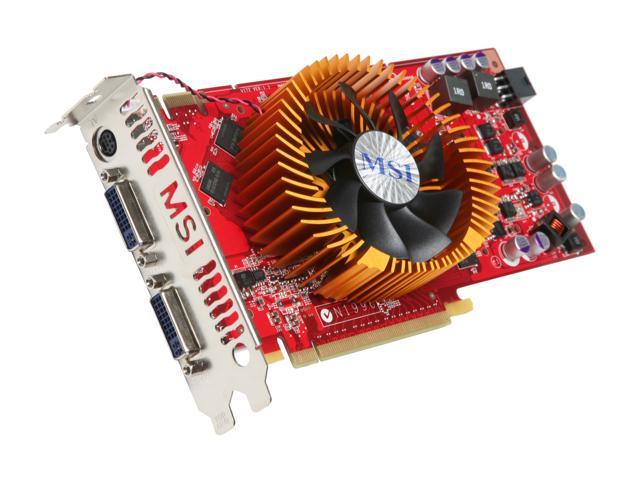
  • MSI N9800GT-T2D512-OC V2 GeForce 9800 GT 512MB 256-bit GDDR3 PCI Express 2.0 x16 HDCP Ready SLI Supported Video Card — I actually bought this first to capitalize on a rebate at Newegg.com. It was fun and games getting this installed, I'll probably talk about that in my next post.
  • Corsair Dual Channel TWINX 2048MB PC6400 DDR2 800MHz E.P.P. Memory (2 x 1024) MPN: TWIN2X2048-6400C4 — In the process of selecting this, I learned a lot about RAM-related stuff like why latency matters
  • AMD Phenom 9500 Processor HD9500WCGDBOX - 2.20GHz, 4 x 512KB Cache, 1800MHz (3600 MT/s) FSB, Agena, Quad-Core, Retail, Socket AM2+, Processor with Fan MPN: HD9500WCGDBOX
  • Asus M3N78 PRO Motherboard - Socket AM2+, Geforce 8300, ATX, HDMI, SATA, Gbit LAN, Hybrid SLI — LOTS research went into this. Initially I was going for a mini-ATX board that cost less than this one, but in every review I read overheating was a major problem, even when the users had full-sized cases. This case has a few extra slots that I don't need right now, but it should definitely handle some future upgrades because it claims to be socket AM3 compatible as well.
  • HP HPDVD1060i DVD Writer - 48x CD-R, 32x CD-RW, 20x DVD±R, 8x DVD±R DL, 6x DVD-RW, SATA MPN: HPDVD1060I — I already have a DVD writer, but it's IDE and the new mobo only has one IDE, which I thought would've been needed to support the two IDE harddrives, but I'll get to what happened with this soon.

The '09 Rebuild Pt. III - Video Card

So I bought the video card before everything else. When it arrived, J and I decided to install it on the current motherboard to see how improved my simming would be. (Bear in mind, TigerDirect had the other components arriving sometime in April, so I was looking to have anything else for awhile). I was sick as a dog that day, but as always, computers are too much of a lure for me to stay in bed. (I once installed a new machine while in the grip of dengue fever LOL)

J helped me get the case on its side and open. He also helped me get two slots open at the back because these newer graphics card take up the space below them. Turns out, that wasn't the only thing extra they need because when we installed the card and turned on the machine... nothing. For a second I thought we'd killed it, but the fans above the big copper middle section (circular too, MSI for the win!) were spinning happily. I got on the laptop and did some hunting around and found out that the card needed its own 6-pin power supply off the PSU. OK... what 6-pin supply? Everything on my PSU except the SATA cables and the main board power had only 4 pins.

That's when things started going over budget (which started at $250, by the way).

Rather than order a converter and wait, I decided to go ahead and get a new PSU because my power supply only provided 50 watts more than what the card called for... probably not good.

My choice?
  • Antec's 650-watt ATX EarthWatts line CPU
I gotta admit, with J's help (I'm hopeless at lining up screws sometimes!) it was remarkably easy — J's help is probably why LOL With the new PSU in, the video card was ready to fly and I've got to say it's impressive. Next up is acquiring an HDMI cable because my Hanspree monitor supports it :-) This is one of the reviews I read http://www.techaddicts.net/reviews/ea650/ea650.html before buying the PSU.

Here's a pic of this bad boy inside the case. I've got to say I like the stylish purple sticker on the side, although as one reviewer said, it doesn't offer much information

The '09 Rebuld Pt. IV - Down to business

Imagine my surprise when I saw the rest of the components I'd ordered on our doorstep less than two days after the video card arrived. TigerDirect had said the motherboard wasn't set to ship for 7-21 days, but there everything was in two big boxes on the front door step. Needless to say, I pressed J' into service, but what's neat is that he's been just as excited as I am about the whole deal.

So we got down to business, literally installing everything except the processor and fan one morning before I headed off to work LOL The processor and fan got installed on my lunch break. We commandeered a part of the kitchen counter for the install, having beat up our knees doing the '04 rebuild on the kitchen floor. (I'd already learned a lesson about static the hard way, having fried a mobo in college trying to install a USB device on my carpet in fuzzy slippers!)

A few issues popped up, but nothing too serious:
  • The full ATX board needed 9 spacers but the old motherboard had only 8. We left the gap at the bottom right corner of the board. I spacers hours later, but by then everything was already hooked up. If I do any serious upgrades, then I'll add the final spacer.
  • The stands for the case prohibited the board from laying flush in the case, so they had to go. Thankfully, J is amazingly handy with a pair of plyers, so out they went! Not too concerned about the case not being elevated because it sits in an elevated position on computer desk, with lots of room all around, so it should be OK.


  • I'm still paranoid about the placement of the board main power. Rather than at the edge of the board by the front side of the case, it's in a bit on the back side of the case (see above). Therefore, the power cord goes over/near to the processor fan. It's wrapped (really nicely, too) but I'd still rather keep cables away from the moving parts in the case.
  • It took a couple seconds for us to realize that even with the case's setup for holding DVD Writers in place, we still needed to attach the screws to the side because that's the mechanism for the locking system lol


  • The case also came with two racks for additional drives down at the bottom right. Those came out at first, but one went back in because of harddrive issues that I'll get to soon.
The hardware install went very well — quick and easy. I hoped the boot up/software side would go just as smoothly, but of course, that wasn't to be the case.