 ... but at least I spend more time with Moo than CNN.com users do on average!
How busy are you...
Pretty darn busy apparently...
 ... but at least I spend more time with Moo than CNN.com users do on average!
The '09 Rebuld Pt. IV - Down to business
Imagine my surprise when I saw the rest of the components I'd ordered on our doorstep less than two days after the video card arrived. TigerDirect had said the motherboard wasn't set to ship for 7-21 days, but there everything was in two big boxes on the front door step. Needless to say, I pressed J' into service, but what's neat is that he's been just as excited as I am about the whole deal.
So we got down to business, literally installing everything except the processor and fan one morning before I headed off to work LOL The processor and fan got installed on my lunch break. We commandeered a part of the kitchen counter for the install, having beat up our knees doing the '04 rebuild on the kitchen floor. (I'd already learned a lesson about static the hard way, having fried a mobo in college trying to install a USB device on my carpet in fuzzy slippers!)
A few issues popped up, but nothing too serious:


 The hardware install went very well — quick and easy. I hoped the boot up/software side would go just as smoothly, but of course, that wasn't to be the case.
So we got down to business, literally installing everything except the processor and fan one morning before I headed off to work LOL The processor and fan got installed on my lunch break. We commandeered a part of the kitchen counter for the install, having beat up our knees doing the '04 rebuild on the kitchen floor. (I'd already learned a lesson about static the hard way, having fried a mobo in college trying to install a USB device on my carpet in fuzzy slippers!)
A few issues popped up, but nothing too serious:
- The full ATX board needed 9 spacers but the old motherboard had only 8. We left the gap at the bottom right corner of the board. I spacers hours later, but by then everything was already hooked up. If I do any serious upgrades, then I'll add the final spacer.
- The stands for the case prohibited the board from laying flush in the case, so they had to go. Thankfully, J is amazingly handy with a pair of plyers, so out they went! Not too concerned about the case not being elevated because it sits in an elevated position on computer desk, with lots of room all around, so it should be OK.

- I'm still paranoid about the placement of the board main power. Rather than at the edge of the board by the front side of the case, it's in a bit on the back side of the case (see above). Therefore, the power cord goes over/near to the processor fan. It's wrapped (really nicely, too) but I'd still rather keep cables away from the moving parts in the case.
- It took a couple seconds for us to realize that even with the case's setup for holding DVD Writers in place, we still needed to attach the screws to the side because that's the mechanism for the locking system lol

- The case also came with two racks for additional drives down at the bottom right. Those came out at first, but one went back in because of harddrive issues that I'll get to soon.


 The hardware install went very well — quick and easy. I hoped the boot up/software side would go just as smoothly, but of course, that wasn't to be the case.
Trance Thursdays!
 Every Thursday afternoon I tune on at DI FM and listen to trance to help me focus and get my pages done. Trance music (especially hard trance) always helped me write great papers, and it seems to do wonders for my page design efforts. The most popular program on Thursdays is A State of Trance with Armin van Buuren — on the DI forum his thread gets pages upon pages of posts each weeks. But here's my problem, the shows that come before and after his are so much better (Global DJ Broadcast with Markus Schulz and Club Elite Sessions with M.I.K.E./Push).
Now before any AVB fans jump on me, think about it. The one common thing you'll see on the forums is that the first hour of ASOT is slow and proggy as all get out (proggy = progressive trance), and if that's what you like, then fine. My preference is the trance and harder trance that you'll hear almost toward the end of the second hour of ASOT and the tunes Schulz and M.I.K.E. play). We'll see what AVB pulls out for ASOT No. 400.
Until then... I'll just keep loving the tunes no matter who plays them!
- Music: Jochen Miller - Face Value
The '09 Rebuild Pt. III - Video Card
So I bought the video card before everything else. When it arrived, J and I decided to install it on the current motherboard to see how improved my simming would be. (Bear in mind, TigerDirect had the other components arriving sometime in April, so I was looking to have anything else for awhile). I was sick as a dog that day, but as always, computers are too much of a lure for me to stay in bed. (I once installed a new machine while in the grip of dengue fever LOL)
J helped me get the case on its side and open. He also helped me get two slots open at the back because these newer graphics card take up the space below them. Turns out, that wasn't the only thing extra they need because when we installed the card and turned on the machine... nothing. For a second I thought we'd killed it, but the fans above the big copper middle section (circular too, MSI for the win!) were spinning happily. I got on the laptop and did some hunting around and found out that the card needed its own 6-pin power supply off the PSU. OK... what 6-pin supply? Everything on my PSU except the SATA cables and the main board power had only 4 pins.
That's when things started going over budget (which started at $250, by the way).
Rather than order a converter and wait, I decided to go ahead and get a new PSU because my power supply only provided 50 watts more than what the card called for... probably not good.
My choice?
 I gotta admit, with J's help (I'm hopeless at lining up screws sometimes!) it was remarkably easy — J's help is probably why LOL With the new PSU in, the video card was ready to fly and I've got to say it's impressive. Next up is acquiring an HDMI cable because my Hanspree monitor supports it :-) This is one of the reviews I read http://www.techaddicts.net/reviews/ea650/ea650.html before buying the PSU.
Here's a pic of this bad boy inside the case. I've got to say I like the stylish purple sticker on the side, although as one reviewer said, it doesn't offer much information

J helped me get the case on its side and open. He also helped me get two slots open at the back because these newer graphics card take up the space below them. Turns out, that wasn't the only thing extra they need because when we installed the card and turned on the machine... nothing. For a second I thought we'd killed it, but the fans above the big copper middle section (circular too, MSI for the win!) were spinning happily. I got on the laptop and did some hunting around and found out that the card needed its own 6-pin power supply off the PSU. OK... what 6-pin supply? Everything on my PSU except the SATA cables and the main board power had only 4 pins.
That's when things started going over budget (which started at $250, by the way).
Rather than order a converter and wait, I decided to go ahead and get a new PSU because my power supply only provided 50 watts more than what the card called for... probably not good.
My choice?
- Antec's 650-watt ATX EarthWatts line CPU
 I gotta admit, with J's help (I'm hopeless at lining up screws sometimes!) it was remarkably easy — J's help is probably why LOL With the new PSU in, the video card was ready to fly and I've got to say it's impressive. Next up is acquiring an HDMI cable because my Hanspree monitor supports it :-) This is one of the reviews I read http://www.techaddicts.net/reviews/ea650/ea650.html before buying the PSU.
Here's a pic of this bad boy inside the case. I've got to say I like the stylish purple sticker on the side, although as one reviewer said, it doesn't offer much information

The '09 Rebuild Pt. II
As we all know, the best laid plans often go asunder... or something like that. Initially, I'd plan to upgrade the motherboard, CPU, memory and video card (I might have left that out in my other post). I used to the minimum system requirements for The Sims 3 as a starting point:
I'd over-build to those specs because more than likely if you run the game with the bare minimum, you'd have to dial back all the graphics settings to the lowest level possible. In addition, I'd built to the minimum specs when The Sims 2 first came up and upgraded to the minimum specs after a few expansions came out, and after both times I had to deal with long load times and slow graphics. It got so bad that (in addition to school), one of the main reasons I stopped playing the Sims was because the video card would act up 5 minutes into playing and drop all the graphics, leaving me with only a pixelated floor plan and just weird, random images.
At this point, I definitely have to give a big shout out and say THANK YOU to my IT guys at work. In the midst of their hellish schedules, they helped see what upgrades my current setup could handle (turned out to upgrade to the fastest processor for my board would cost the same as a new quad-core mobo/CPU combo lol) and helped me narrow down my list of parts to purchase. I did a lot of research at Overclock.net and combed through reviews at TigerDirect.com, Newegg.com and a host of other sites.
After a lot of back and forth. Here's the list:


- Windows XP (Service Pack 2)
- 2.0 GHz P4 processor or equivalent
- 1 GB RAM
- At least 6.5 GB of hard drive space with at least 1 GB additional space for custom content
- 128 MB Video Card with support for Pixel Shader 2.0
- Supported NVIDIA Geforce cards (I prefer them over ATI Radeon, just based on personal preference)
FX 5900, FX 5950
6200, 6500, 6600, 6800,
7200, 7300, 7600, 7800, 7900, 7950
8400, 8500, 8600, 8800
9600, 9800, GTX 260, GTX 280
I'd over-build to those specs because more than likely if you run the game with the bare minimum, you'd have to dial back all the graphics settings to the lowest level possible. In addition, I'd built to the minimum specs when The Sims 2 first came up and upgraded to the minimum specs after a few expansions came out, and after both times I had to deal with long load times and slow graphics. It got so bad that (in addition to school), one of the main reasons I stopped playing the Sims was because the video card would act up 5 minutes into playing and drop all the graphics, leaving me with only a pixelated floor plan and just weird, random images.
At this point, I definitely have to give a big shout out and say THANK YOU to my IT guys at work. In the midst of their hellish schedules, they helped see what upgrades my current setup could handle (turned out to upgrade to the fastest processor for my board would cost the same as a new quad-core mobo/CPU combo lol) and helped me narrow down my list of parts to purchase. I did a lot of research at Overclock.net and combed through reviews at TigerDirect.com, Newegg.com and a host of other sites.
After a lot of back and forth. Here's the list:
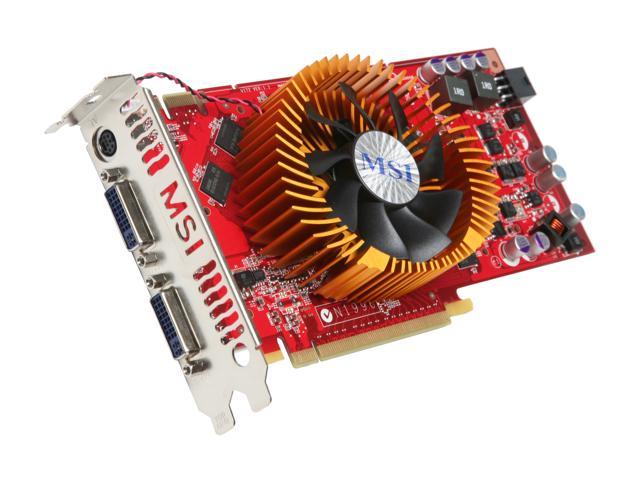
- MSI N9800GT-T2D512-OC V2 GeForce 9800 GT 512MB 256-bit GDDR3 PCI Express 2.0 x16 HDCP Ready SLI Supported Video Card — I actually bought this first to capitalize on a rebate at Newegg.com. It was fun and games getting this installed, I'll probably talk about that in my next post.
Corsair Dual Channel TWINX 2048MB PC6400 DDR2 800MHz E.P.P. Memory (2 x 1024) MPN: TWIN2X2048-6400C4 — In the process of selecting this, I learned a lot about RAM-related stuff like why latency matters
- AMD Phenom 9500 Processor HD9500WCGDBOX - 2.20GHz, 4 x 512KB Cache, 1800MHz (3600 MT/s) FSB, Agena, Quad-Core, Retail, Socket AM2+, Processor with Fan MPN: HD9500WCGDBOX


- Asus M3N78 PRO Motherboard - Socket AM2+, Geforce 8300, ATX, HDMI, SATA, Gbit LAN, Hybrid SLI — LOTS research went into this. Initially I was going for a mini-ATX board that cost less than this one, but in every review I read overheating was a major problem, even when the users had full-sized cases. This case has a few extra slots that I don't need right now, but it should definitely handle some future upgrades because it claims to be socket AM3 compatible as well.
- HP HPDVD1060i DVD Writer - 48x CD-R, 32x CD-RW, 20x DVD±R, 8x DVD±R DL, 6x DVD-RW, SATA MPN: HPDVD1060I — I already have a DVD writer, but it's IDE and the new mobo only has one IDE, which I thought would've been needed to support the two IDE harddrives, but I'll get to what happened with this soon.
Subscribe to:
Posts (Atom)